Bill Trackers · PDF
Bill Payment Tracker
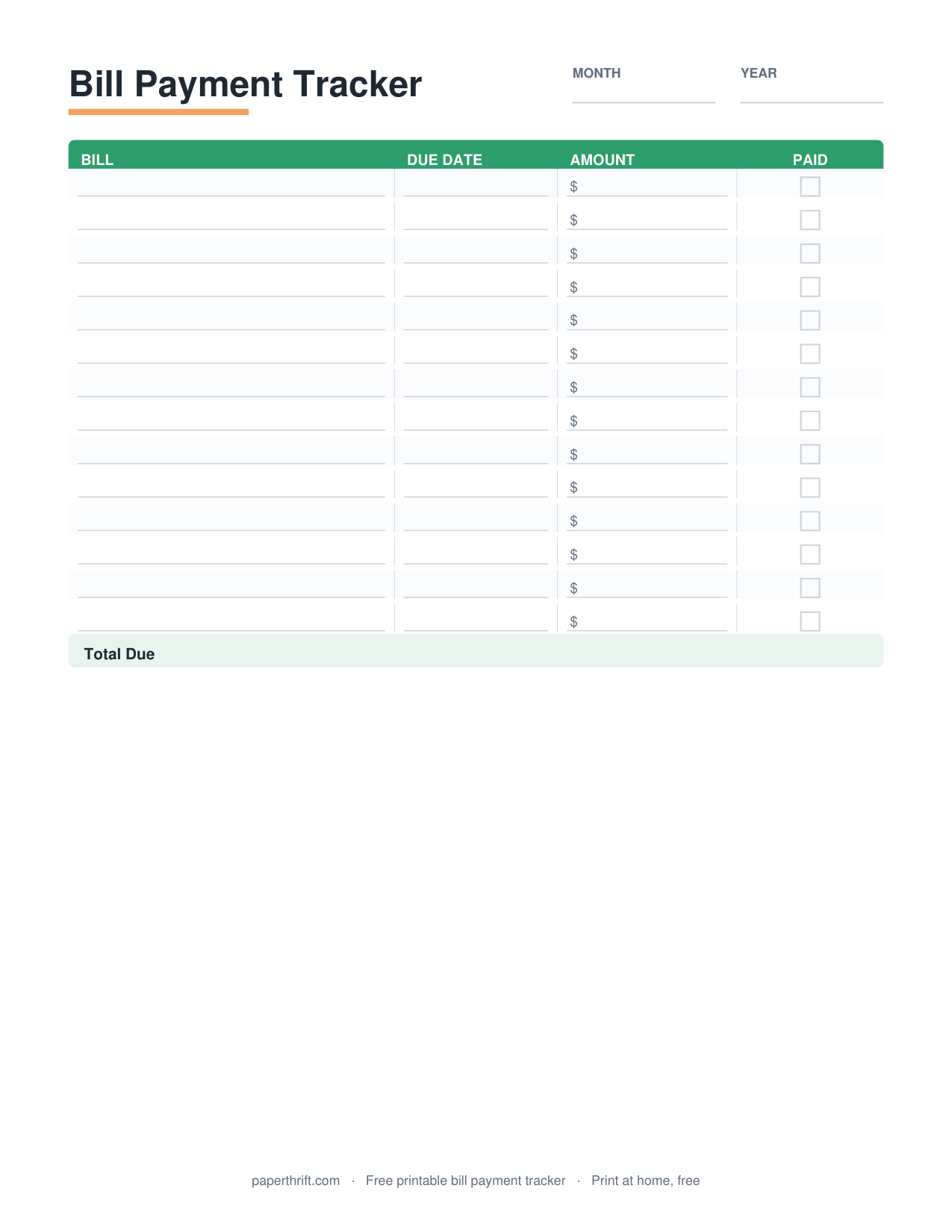
A bill payment tracker is a printable sheet that lists each bill with its due date, amount, and a paid checkbox, so you can see at a glance which bills are paid and which are still owed each month.
Pick a color theme
What is a bill payment tracker?
A bill payment tracker is a printable sheet that records each bill, its due date, the amount owed, and a paid checkbox. It gives you one place to confirm every monthly payment is made on time and nothing slips through.
A bill payment tracker turns scattered due dates into a single, scannable list. Each row holds one bill: the biller name, the due date, the amount, the date you paid, and a checkbox you mark when the payment clears. You fill it in once at the start of the month, then check off bills as you pay them.
The tracker answers one question fast: what still needs to be paid? Common bills include rent or mortgage, electricity, water, internet, phone, car payment, insurance, and credit card minimums. Listing every recurring charge in one spot stops the "I think I paid that" guesswork. For a fuller money picture, pair it with a monthly budget worksheet so your bill totals line up with your income, and learn the bigger workflow in how to make a budget.
How do you use a bill payment tracker?
List every recurring bill, write each due date and amount, then check the paid box and record the payment date as each bill clears. Review the sheet weekly to catch any unpaid bill before its due date passes.
Start by writing every recurring bill in date order, earliest due date first. Add the amount for each one. Bills that change month to month, like electricity or a credit card balance, get filled in when the statement arrives. Fixed bills, like rent or a car payment, can be written for the whole year at once.
As you pay, mark the checkbox and note the payment date. A quick weekly scan shows any bill due soon that is still unchecked, which is your cue to act before a late fee hits. Tracking due dates this way protects your payment history, the single largest factor in your credit score. To go deeper, route specific recurring charges to a companion tracker like the subscription tracker for streaming and apps, and use the expense tracker for one-off spending that is not a recurring bill.
What should a bill payment tracker include?
A useful bill payment tracker includes the biller name, due date, amount due, date paid, a paid checkbox, and a payment method column. A monthly total at the bottom shows your full fixed-bill load at a glance.
The core columns are biller name, due date, amount, date paid, and a paid checkbox. Add a payment method column (autopay, bank transfer, card, or check) so you know which bills move on their own and which need a manual push. A notes column is handy for confirmation numbers or "price went up."
One detail most templates skip: an autopay flag. Marking which bills are on autopay tells you exactly which rows to verify rather than initiate, so you confirm the charge hit your account instead of accidentally paying twice. A monthly total at the bottom reveals your fixed obligations, the number that drives the rest of your plan. Feed that total into the 50/30/20 budget needs category, and if a big annual bill like insurance strains one month, smooth it out with a sinking funds tracker.
A sample month at a glance: rent $1,400 due the 1st, car insurance $135 due the 7th, electric $95 due the 14th, internet $70 due the 18th, phone $65 due the 22nd, streaming $31 due the 28th — $1,796 total, six checkmarks, zero late fees.
How to use this printable
- Download and print Download the free bill payment tracker PDF and print it on US Letter or A4 paper at home. No email or signup required.
- List every bill Write each recurring bill in due-date order, earliest first, including rent, utilities, phone, insurance, and any loan or card payments.
- Add due dates and amounts Fill in the due date and amount for each bill. Enter variable amounts when the statement arrives; write fixed amounts in advance.
- Check off as you pay Mark the paid checkbox and note the date paid each time a bill clears, so unpaid bills stay visibly unchecked.
- Review weekly Scan the sheet once a week for any unchecked bill due soon, then pay it before the due date to avoid late fees.
How to print it
- Print on US Letter (8.5 x 11 in) or A4; set printer scaling to 100% or Fit to Page so columns are not cut off.
- Choose Black and White or Grayscale to save color ink, since the tracker uses simple lines and checkboxes.
- Print one sheet per month and store them in a binder to keep a year of payment history in order.
- Print on slightly heavier paper or slip the page in a sheet protector if you want to reuse it with a dry-erase marker.
Frequently asked questions
Is the bill payment tracker really free?
Yes. The bill payment tracker is 100% free to download and print. There is no cost, no email, and no signup required. Click the link, save the PDF, and print it at home.
Should I organize bills by due date or by category?
List bills by due date, earliest first. A date-ordered list turns the tracker into a payment schedule you read top to bottom through the month, so nothing slips past its deadline.
What paper size does it print on?
The tracker prints on both US Letter (8.5 x 11 inches) and A4. Set your printer scaling to 100% or Fit to Page so every column fits on the page.
How is a bill payment tracker different from an expense tracker?
A bill payment tracker logs recurring bills and due dates with paid checkboxes. An expense tracker records all day-to-day spending. Use the bill tracker for fixed bills and the expense tracker for variable purchases.
Can I track bills for the whole year?
Yes. Print one sheet per month and keep them in a binder for a full year of payment history. Fixed bills like rent can be written in advance; variable bills are filled in when each statement arrives.
Paperthrift provides free educational budgeting tools and printables. It does not offer financial, investment, or tax advice. For decisions about your specific situation, consider speaking with a qualified professional.